




Software Review for Reviewers
Last updated on 2026-04-27 | Edit this page
Overview
Questions
- What are my responsibilities as a reviewer of software?
- How do I conduct a software review?
Objectives
- Explain the topics that need to be covered during review.
- Conduct a software review.
Software Review Overview
All USGS open-source software projects must undergo an administrative review. Official USGS software products must undergo two additional forms of review: Technical code review and scientific (domain) review. For an official overview, see Types of Software Review.
Administrative Review
The administrative reviewer’s duty is to make sure that the entire history of the project is free of potential security or privacy violations. There are several types of information which must not be present in code released to the public:
- Personally identifiable information (PII)
- Absolute file system paths
- Internal server host names or IP addresses
- Usernames or passwords
This review must be done for every commit in the released software. This can be a very onerous requirement if it is to be done all at once. For that reason, collaborative workflows where changes to the codebase go through merge requests are a very good way of making sure that the administrative review has been adequately done.
It is acceptable for team members to review each others’ contributions, even if they are both listed as authors of the software. Reviewing a merge request is done by people who are not authors on that specific code; they are only “authors” of the project generally. Therefore, mutual in-team reviews are a convenient way to comply with this requirement.
Technical code review
The technical code review focuses on such concerns as adherence to coding standards and other measures of code quality. This review is required for all official USGS software products, but not for provisional products. Unlike administrative review, this does not need to be done for every commit of the released software.
Typical focuses in technical code review include
- checking for adherence to explicit coding standards, such as conventions for naming variables and functions
- ensuring that unit tests pass
- inspecting for vulnerabilities or bugs
Some of these areas of concern are amenable to automation. For instance, linter software can test for adherence to coding standards, calculate measures of code complexity, and identify common bug-prone patterns.
Scientific (domain) review
Scientific software requires a domain review as well. Like the technical code review, the domain review only needs to be done on the end product, not on individual commits. What constitutes an appropriate domain review will vary a great deal depending on the domain, but generally involves checking for scientific flaws or errors. It is similar to a peer review for a scientific publication: checking that the methods are applied correctly and are appropriate for the scientific question. You can leverage community resources, such as CDI or your local colleagues, for insight into scientific reviews in your domain.
How To Make The Review Streamlined
The person requesting the review may have already set up a way for you to do the review. For instance, if following the instructions in Review for Authors, they will have created a GitLab merge request where you can conduct your review.
There are many possible ways to do reviews, including methods such as Word documents which do not involve git at all. But if the reviewer has not specified how to conduct the review, one good way to do it is to create your own GitLab issue. Using either the issue title or a label, make clear what kind of review you are doing, and what version or tag of the software it pertains to. Now you can put your comments, requests for changes, or approval into this issue. This keeps everything tied into the code repository, rather than in email or Teams chats, where it could get lost.
Below, we describe the process for adding comments to a merge request created by the authors.
Adding Comments to Your Review
Let us try adding a comment to a merge request as a reviewer and as an author.
Reviewer Role:
- Navigate to Code -> Commits
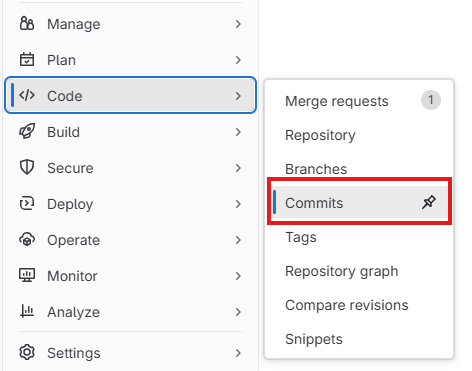
Make sure you are on the
mainbranchCopy commit SHA

Start a new comment in the merge request: “Starting review as of commit [paste commit SHA]
Click
Comment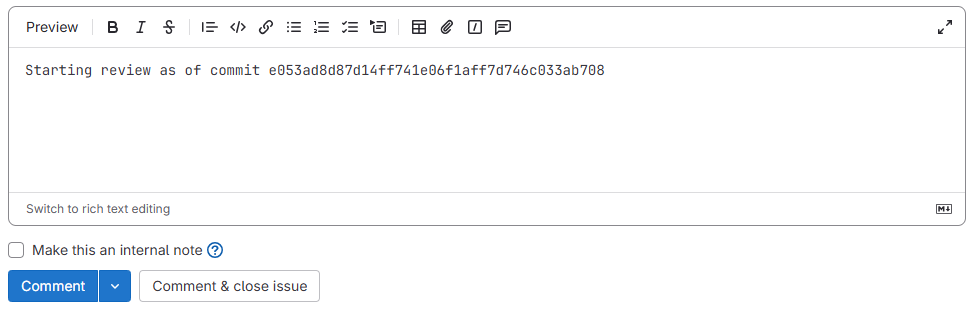
In the example exercise here, you start your review with the metadata file first and note that a date needs to be updated. Navigate to the
Changestab within the merge request and find the code.json file.Right click on the line number next to ‘metadataLastUpdated’, which will insert a comment under that line of code.
Add your comment (e.g., “Make sure to update the metadataLastUpdated date before you submit for publication”)
Click
Start a reviewClick
Finish review, selectComment,Approve, orRequest changes, andSubmit review. During a real review, you would continue adding comments to your review. For this exercise, we will have only this one comment.
Author Role:
For reconciling a review, you can create a branch to address all comments. In this exercise, we just have one comment to address:
- Create a feature branch to address the comment
- Open editor and make the change
- Stage, commit, and push the changes
BASH
git add code.json
git commit -m "Update metadataLastUpdated date per review comment"
git push -u origin review-recon-1.0.0- Create merge request and merge to
mainin GitLab - Once it is merged to
mainyou can pull it down locally to keep everything in sync:
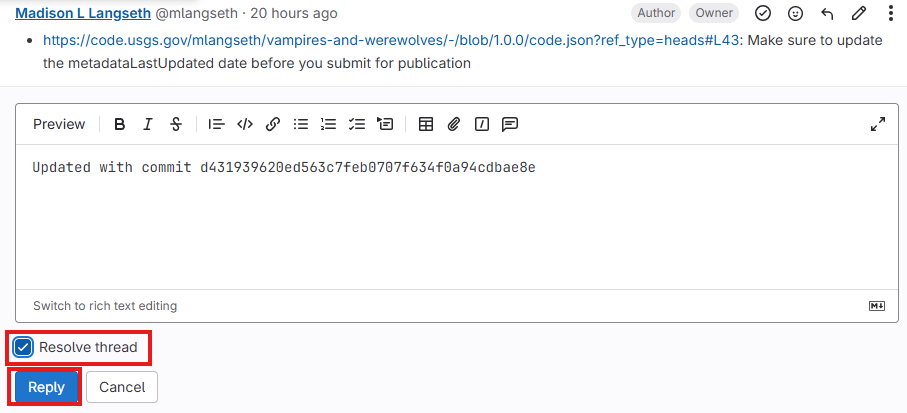
- Reply to the comment in the merge request with the commit SHA for the commit in which the comment was addressed. If you addressed the comment with a change to the same line of code, GitLab will automatically include the commit SHA and provide a diff so you can see the changes.
- An administrative review is required for all open-source software projects
- A technical code review and a scientific domain review are required for official USGS software products
- There are many ways to conduct and document a software review. One way is by creating a GitLab merge request with comments documenting the review